


How to Optimize Your Website to Be Found in 2026

If one of your goals for 2026 is to get more eyes on your business without doubling your workload, start with your website. Website optimization is one of the simplest ways to increase visibility, improve user experience, and book more of the right clients.
Your site is your hardest-working employee, but only if it’s set up to be found, understood, and trusted.
You don’t need complicated tech or a full website overhaul to make meaningful progress. A few intentional tweaks can help your site show up more often and convert more consistently… which means a more beautiful, bookable brand all around.
Here’s how to refresh your website for 2026 step-by-step.
Update the Basics (Yes, Even Your Footer)
First things first, check your footer. If it still says © 2023 or © 2024, it’s time to update it.
This seems tiny, but it instantly signals to Google (and your audience) that your site is active, current, and cared for.
You can update it to:
- © 2026 if your website is brand new this year, or
- © [date your website launched] – 2026
It takes 30 seconds and makes your site feel cared for and not an afterthought.
Give Your On-Page SEO a Quick Tune-Up
You don’t need to be an SEO expert to make your website more searchable. Start with the simplest wins.
What SEO Actually Is (and Why It Matters)
SEO (Search Engine Optimization) is how search engines understand what your website is about and decide when to show it to people searching for what you offer.
And yes, SEO matters whether you’re:
- an online service provider
- a brick-and-mortar business
- a local provider
- a national brand
If you want more inquiries, more bookings, and more visibility… SEO is part of the puzzle.
Google doesn’t rank websites based on vibes or aesthetics. It ranks them based on clarity, relevance, structure, and how well your content matches what people are actually searching for. When your site clearly communicates what you do, who it’s for, and how each page fits together, it becomes easier to find and easier to trust.
And that trust is what leads to bookings.
How to Update On-Page SEO in Showit (Step-by-Step)
If your site is built on Showit, on-page SEO updates are very doable without touching code. Here’s where to focus: Page Titles & Meta Descriptions
- In Showit, click into a page
- Open SEO Settings
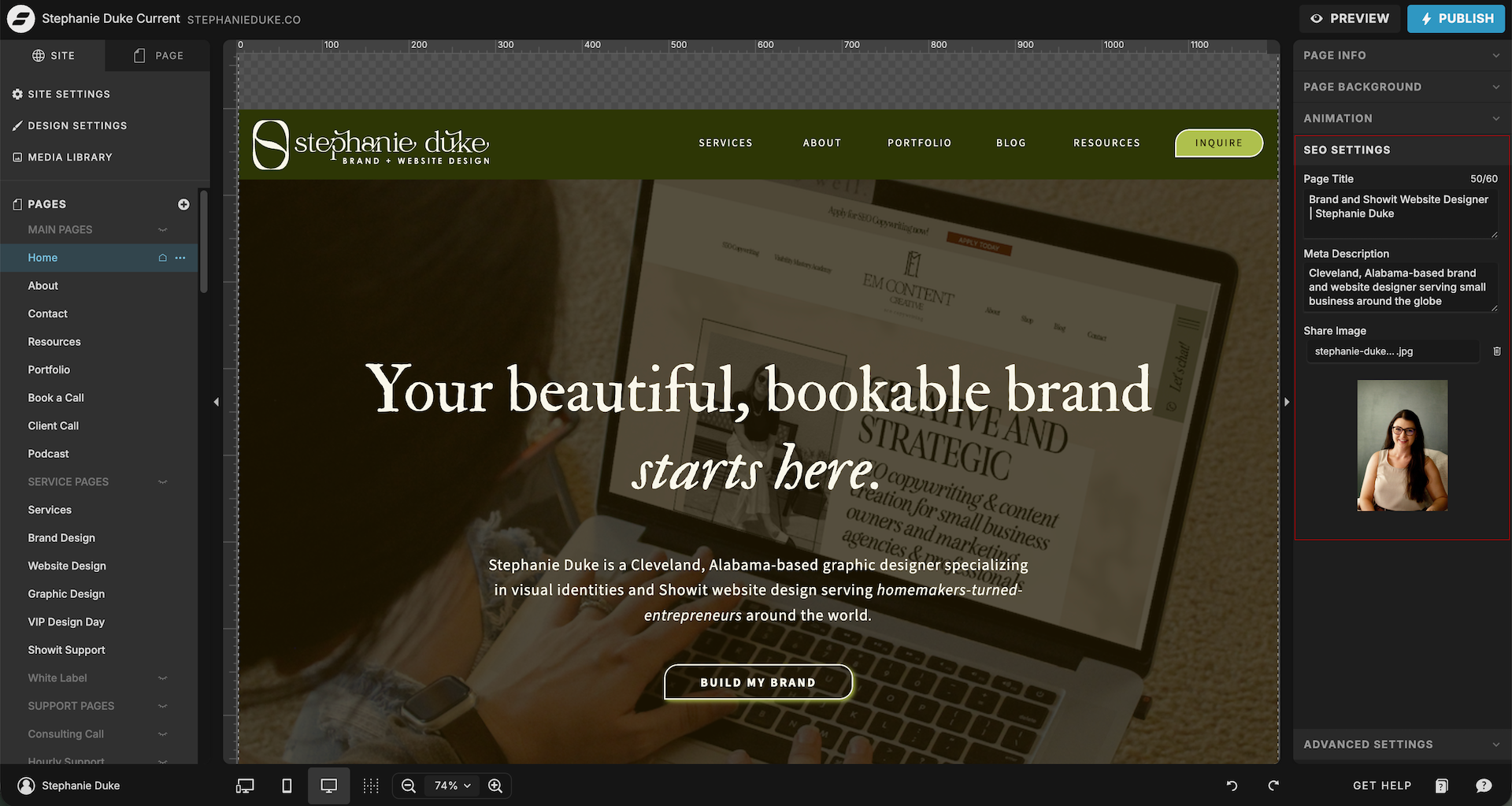
- Add a clear page title (what you want the page to rank for)
- Write a short meta description that explains what the page is about. Aim for 150–160 characters so it displays properly in search results.
Here’s an example:
Page title: Brand & Showit Website Design for Small Businesses
Meta description: Custom branding and Showit website design to help small businesses build a beautiful, bookable online presence.
This is what shows up in Google search results. If it’s blank or vague, you’re missing a huge opportunity.
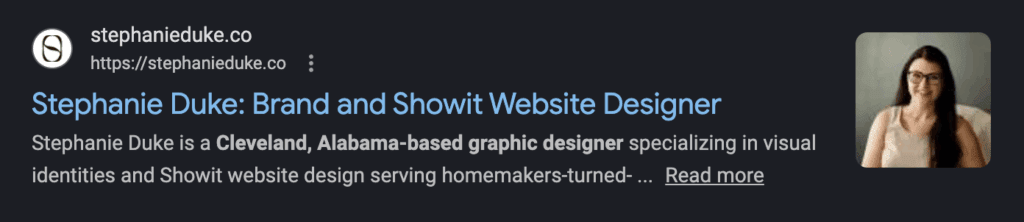
Google will sometimes write your page title and meta description for you. As long as the content on your page accurately reflects what you want to be found for, this is usually fine.
Check Your Heading Structure
This one matters more than people realize. Never use more than one H1 tag per page.
Your H1 is the main title of your page — your big “this page is about ____” signal to Google. Using multiple H1s confuses search engines and waters down your keywords.
Quick audit checklist:
- 1 H1 per page
- H2s and H3s for section headlines and sub headlines
- Headlines reflect the words people ACTUALLY search (not cutesy phrases)
Here’s an example comparison:
Cutesy: “Crafting digital spaces that feel like home”
Better: “Brand & Website Design for Small Businesses”
Cute doesn’t convert — clarity does. This doesn’t mean your copy can’t have personality. Just make sure you are clear, especially in your headlines. Body copy can have a bit more “oomph” to it, but even then it still needs to be clear what you’re talking about.
Make Your Website Skimmable
People don’t read websites. They skim them. You can thank TikTok and dwindling attention spans for that.
So every page should have one clear purpose, broken up into digestible, intentional sections. Avoid big blocks of text even in your blog posts.
Notice how in this blog post I’m not stringing 5-6+ sentences together. Each paragraph may be only 1-3 sentences broken up by bullet points and section headers. This creates a visual rhythm that keeps readers engaged.
Okay, so back to website pages – ask yourself:
- Does each section have a job?
- Is the copy short, direct, and value-driven?
- Are my CTAs obvious and easy to find?
If someone lands on your site while nursing a baby, cooking dinner, or taking a five-minute breather (🙋🏻♀️), they should still instantly understand who you are and what you offer.
Simplify Your Navigation
A clean menu = clear direction.
You don’t need a mega menu with 15+ options. If your menu is packed with clever names like:
- Explore
- The Experience
- The Vault
- Learn
- Discover
- Resources
- Offerings
…you’ve just made them work harder than they need to.
Clear navigation improves user experience because it reduces overwhelm. It speeds up decision-making. It helps visitors find what they need without thinking. It keeps them on your site longer (which Google loves).
Your best bet is to stick to 6–8 main links. This helps your viewers avoid decision fatigue.
Label each button something quickly recognizable and simple. Home, About, Services, Blog, Contact. Don’t make people have to think about what they’re clicking. Clarity reduces friction and increases conversions.
Once you have your main 6-8 links, everything else can live:
- In your footer, or
- Inside the pages themselves (like individual blog posts living under your main blog page)
The simpler your navigation, the easier your audience (and Google) can move through your site and make a booking decision.
Commit to Fresh Content (It Doesn’t Have to Be a Blog)
Google and AI-powered search tools prioritize active, updated websites. This doesn’t mean daily blog posts. It means showing signs of life.
According to Google’s own documentation on how search works, their systems are constantly evaluating content for relevance, usefulness, and freshness — especially when the information could change over time or reflect an active business.
Source: https://developers.google.com/search/docs/fundamentals/how-search-works
This is especially important for service-based businesses, where trust and relevance play a major role in search visibility. That means an actively maintained website says this business still exists. This information is current. This brand is paying attention.

And that matters to both Google and real humans.
Fresh content does not mean you need to publish weekly blog posts forever. It simply means your site shouldn’t feel abandoned.
Fresh updates can look like:
- Publishing or updating blog posts
- Adding new testimonials or portfolio pieces
- Launching a new freebie (new landing page)
- Updating service descriptions
- Creating an affiliate page
- Refreshing copy to reflect current offers
- Updating experience stats like “years in business”
- Adding events, workshops, or seasonal offerings
- Including new brand shoot photos
Even small updates help Google better understand your site and give people confidence that your business is alive and well.
Consistency builds credibility — for both humans and algorithms.
Install Google Analytics (Quick Showit Tutorial)
If you’re not tracking your website, you’re guessing about your audience and website performance. Google Analytics shows you:
- Where your traffic comes from
- What pages people actually visit
- What content keeps attention
- Where people leave
- What’s working (and what isn’t)
How to Add Google Analytics to Showit
- Create a Google Analytics account at analytics.google.com
- Set up a new property
- Copy your Measurement ID (starts with “G-”)
- In Showit:
- Go to Site Settings
- Paste the ID into the Google Analytics field
- Publish your site
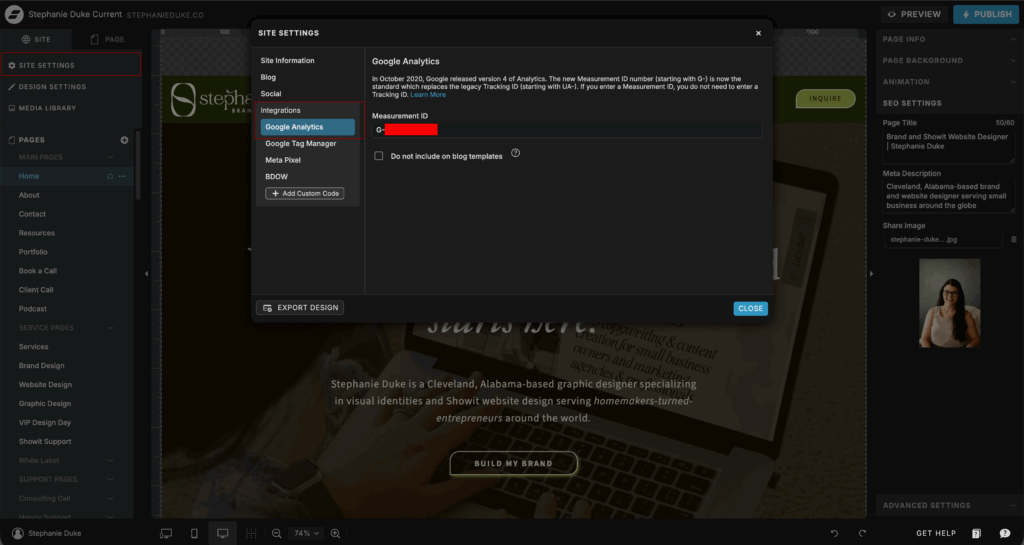
That’s it.
You don’t need to analyze everything right away. Even just knowing:
- Top pages
- Traffic sources
- Popular blog posts
…will help you make smarter decisions in 2026. Over time, this data helps you refine your content, improve SEO, and double down on what’s actually working.
Revisit Your Core Brand Strategy
If you really want to set yourself up for a strong 2026, zoom out and ask: Does my brand (visually and verbally) support where my business is going?
This might be the year for a full glow-up:
- Updated brand identity
- New copy
- Fresh photos
- A fully revamped website
A beautiful, bookable brand is built on clarity, consistency, and connection.
If your brand is outdated, confusing, or piecemealed together… no amount of SEO tweaks can compensate for the disconnect.
All of This Improves User Experience
SEO and user experience are not separate things. Clear headings help Google and skimmers.
Simple navigation helps Google and tired moms on their phones.
Fresh content helps Google and builds trust with real people.
A website that’s easy to understand is easier to book from. That’s the heart of a beautiful, bookable brand.
Want Help Planning Your 2026 Website Refresh?
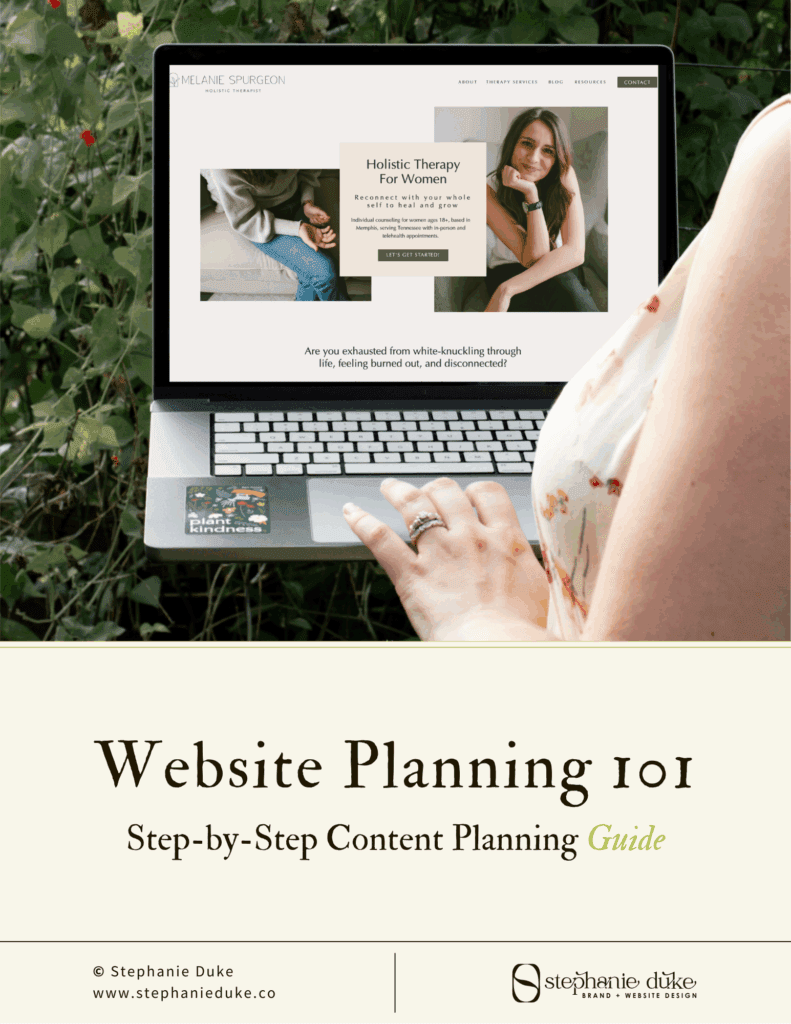
Grab my free Website Planning Guide — it walks you through exactly what to include on each page, how to structure your content, and how to create a site that’s both beautiful and bookable.
👉 Download it for free here


I’m Stephanie, but you can call me Steph!
I design brands & websites that get you butterflies-in-your-stomach-excited about your business again.
Simply put, I’m a graphic designer that specializes in brand identity design and Showit website design - arguably the most important aspects of your business! I live in central Alabama with my high school band directing hubby, Thomas, on our modest homestead in the country.

Design that gives you confidence in your brand and time back in your day. Design that gives you confidence in your brand and time back in your day. Design that gives you confidence in your brand and time back in your day. Design that gives you confidence in your brand and time back in your day. Design that gives you confidence in your brand and time back in your day. Design that gives you confidence in your brand and time back in your day. Design that gives you confidence in your brand and time back in your day. Design that gives you confidence in your brand and time back in your day. Design that gives you confidence in your brand and time back in your day. Design that gives you confidence in your brand and time back in your day. Design that gives you confidence in your brand and time back in your day. Design that gives you confidence in your brand and time back in your day. Design that gives you confidence in your brand and time back in your day. Design that gives you confidence in your brand and time back in your day.


your guide to a stress-free website
FREE Website Planning Tool
- My exact Website Copy Planner Google Doc
- A master doc for keeping track of links and embed codes
- Loads of tips and tricks for planning website content (copy, photos, branding, etc) with ease
